Printing PETG on the Bambu P1S can produce great functional parts with durable surfaces. However, one of the most common issues users encounter is stringing — thin strands of filament that appear between gaps, posts, or detailed geometry. Stringing is especially common with PETG because the material stays sticky at higher temperatures and does not break cleanly during travel moves. Fortunately, most stringing issues can be reduced with the right slicer settings and small tuning adjustments. (reduce stringing Bambu P1S PETG)
Optimize Temperature for PETG
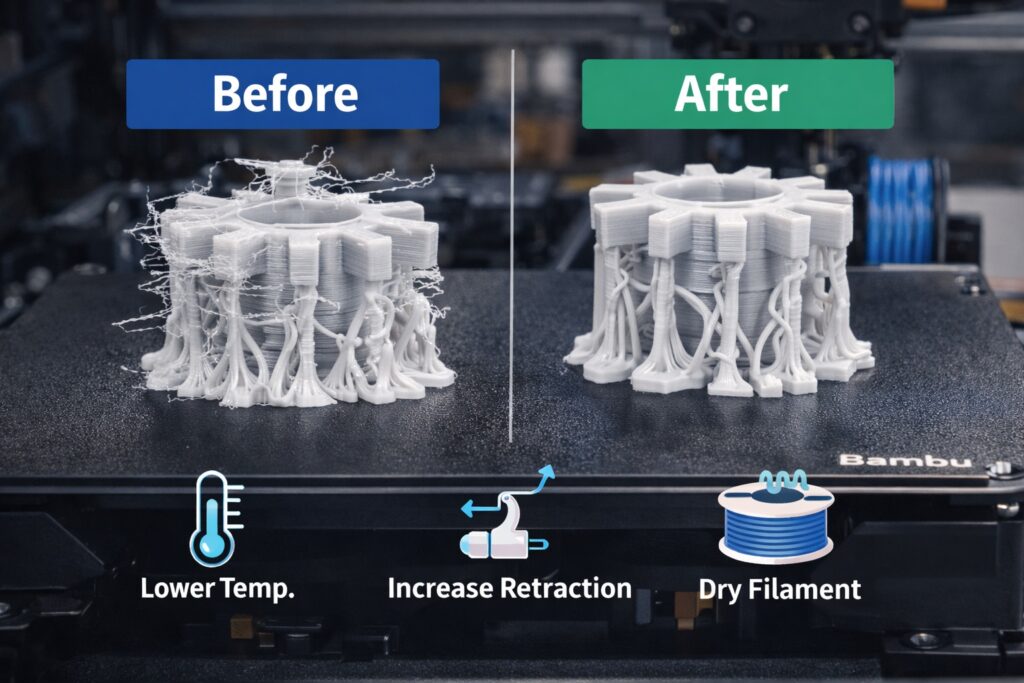
Stringing increases when PETG is printed at temperatures that are too high. For the Bambu P1S, a temperature range of 225°C to 240°C is typical. If you see excessive stringing, begin lowering the nozzle temperature in 5°C steps until you reach a balance between adhesion and cleanliness. Avoid going too low, as PETG requires sufficient heat for strong layer bonding.
Increase Retraction Settings
Retraction has a large influence on stringing. In Bambu Studio, start with:
- Retraction Distance: 0.8 mm – 1.2 mm
- Retraction Speed: 25 mm/s – 35 mm/s
PETG does not tolerate aggressive retraction like PLA, so make changes gradually. Too much retraction can lead to jams or heat creep in the hotend.
Adjust Travel Speed
Faster travel speeds can help reduce the time PETG has to ooze during movements. Bambu default travel speeds are already high, but raising them slightly to 220–260 mm/s can improve stringing without sacrificing detail.
Reduce Nozzle Pressure
Linear Advance (Pressure Advance) settings affect how quickly the nozzle depressurizes after extrusion. If enabled, ensure the calibration is correct. Over-pressure can push molten PETG out of the nozzle during non-print movements.
Enable Wipe and Coasting Features
Features like wipe and coast reduce PETG buildup at the end of extrusion paths. In Bambu Studio, enabling wipe at 0.5–1.0 mm can noticeably clean transitions.
Dry Your Filament
PETG absorbs moisture, and wet filament increases stringing. Store spools in a dry box and consider drying at 65°C for 4–6 hours if popping or bubbling is heard during printing.
Conclusion
Stringing on the Bambu P1S when printing PETG is common but highly manageable. By lowering temperature, tuning retraction, increasing travel speed, and keeping filament dry, you can achieve significantly cleaner prints with minimal post-processing.
Q: Why does PETG string on the Bambu P1S?
A: PETG tends to string because it stays sticky at high temperatures and continues to ooze during travel moves. Tuning temperature and retraction reduces this issue.
Q: What temperature should I print PETG at on the Bambu P1S?
A: Start around 225°C–240°C and reduce in 5°C increments until stringing improves without compromising layer bonding.
Q: Does drying PETG help reduce stringing?
A: Yes. Moist PETG increases oozing and surface artifacts. Drying at 65°C for 4–6 hours often improves results.