PETG is a great filament choice if you want stronger, tougher, and more heat-resistant prints than PLA. It works well for brackets, tools, outdoor parts, functional models, and everyday 3D printed objects. However, PETG can also cause stringing, blobs, rough walls, and weak layer bonding when the settings are not correct.
With the right Bambu Lab PETG settings, you can get clean surfaces, strong layers, and reliable results. The key is to balance nozzle temperature, bed temperature, speed, cooling, and filament drying.
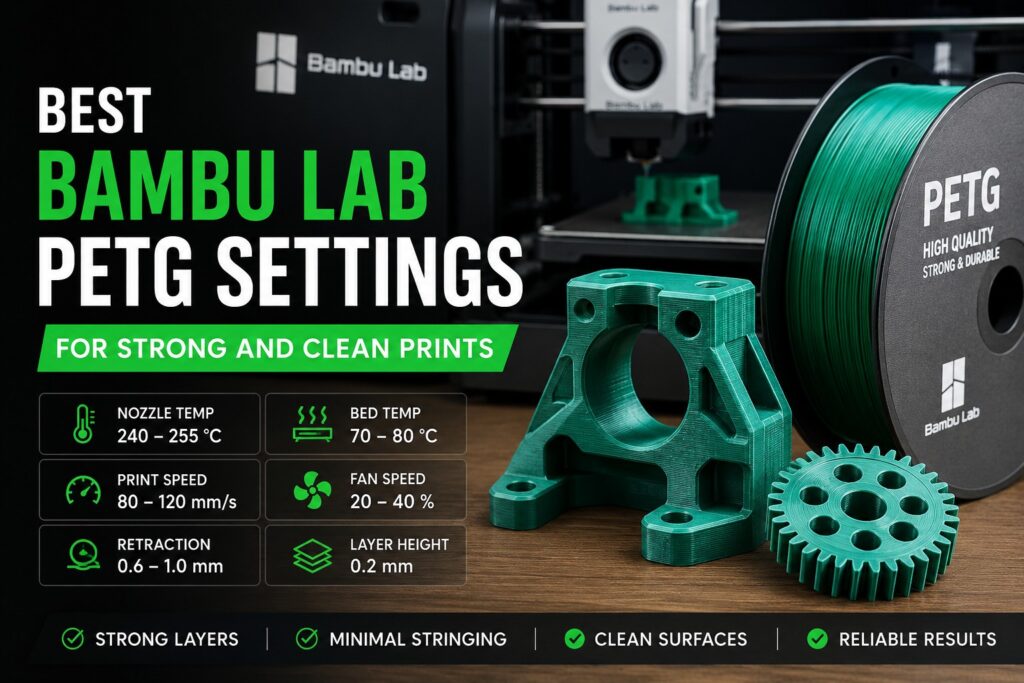
Recommended Bambu Lab PETG Settings
Here are good starting settings for most Bambu Lab printers:
| Setting | Recommended Value |
|---|---|
| Nozzle Temperature | 240°C – 255°C |
| Bed Temperature | 70°C – 80°C |
| Print Speed | 80 – 120 mm/s |
| Fan Speed | 20% – 40% |
| Layer Height | 0.2 mm |
| Wall Count | 3 – 4 walls |
| Infill | 15% – 30% |
| Retraction | 0.6 – 1.0 mm |
These settings are not fixed rules. PETG brands can behave differently, so small adjustments may be needed.
Nozzle and Bed Temperature
For most PETG prints, a nozzle temperature between 240°C and 255°C gives strong layer adhesion. If the layers look weak or separate easily, increase the nozzle temperature by 5°C. If you see too many blobs or strings, lower the temperature slightly.
The bed temperature should usually be set between 70°C and 80°C. This helps the first layer stick well and reduces warping. Do not print PETG too close to the bed, because it can stick too strongly to some build plates.
Speed and Cooling Settings
PETG does not always perform well at very high speeds. Even on fast Bambu Lab printers, slower settings often give cleaner and stronger results. For functional parts, use 80–120 mm/s as a safe range.
Cooling should be lower than PLA. A fan speed of 20% to 40% is usually enough. Too much cooling can weaken layer bonding, while too little cooling may cause messy overhangs. For bridges and detailed areas, you can use slightly higher fan speed.
How to Reduce PETG Stringing
Stringing is one of the most common PETG problems. To reduce it, dry your filament before printing. Wet PETG often causes bubbles, popping sounds, rough walls, and heavy stringing.
Also check these points:
- Lower nozzle temperature by 5°C if stringing is heavy.
- Keep filament dry before and during printing.
- Use the correct Bambu Lab PETG profile.
- Enable retraction if needed.
- Avoid printing too fast for detailed parts.
Best Strength Settings for PETG
For stronger PETG prints, wall count is very important. Use 3 to 4 walls for normal parts. For load-bearing parts, increase the wall count before increasing infill. Walls often add more real strength than high infill.
A 0.2 mm layer height is a good balance between strength, speed, and surface quality. Use 15% to 30% infill for most prints. For mechanical parts, choose a stronger infill pattern and use more walls.
Final Tips
The best Bambu Lab PETG settings depend on your filament brand and model shape. Start with the recommended values, then adjust one setting at a time. If you want cleaner prints, focus on drying, temperature, and speed. If you want stronger prints, focus on nozzle temperature, wall count, and cooling balance.